Helping shy and commuter students make friends in a big cohort with TStar

A mobile app that helps U of T students make friends in their own cohort, without having to say hi first.

Goal
?Wait for someone to say hiSay hi with one tap
Help shy and commuter students start friendships.
Result
3 / 3
Testers finished both tasks on our mid-fi prototype.
My part
Team of 5

Ran the surveySketched quest screensRan tests

On my own

RedesignLaunch film

Team project, then my own redesign.
Role
5 designers
Skills
UX research, product design, prototyping, usability testing
Duration
Oct – Dec 2025

The problem

Students meet plenty of people, but do not feel connected

Big lectures, long commutes and networking-style events make it hard to turn a classmate into a friend. Our survey showed how common that is.

Rarely hang out with classmates outside class57%
Call themselves reserved55%
Say lack of time or energy gets in the way53%
Meet new people through group chats or Discord70%

The solution

TStar, a cohort-only app where saying hi takes one tap

TStar shows students the classmates in their own program and gives them small, low-pressure ways to connect. Nobody has to send a cold first message.

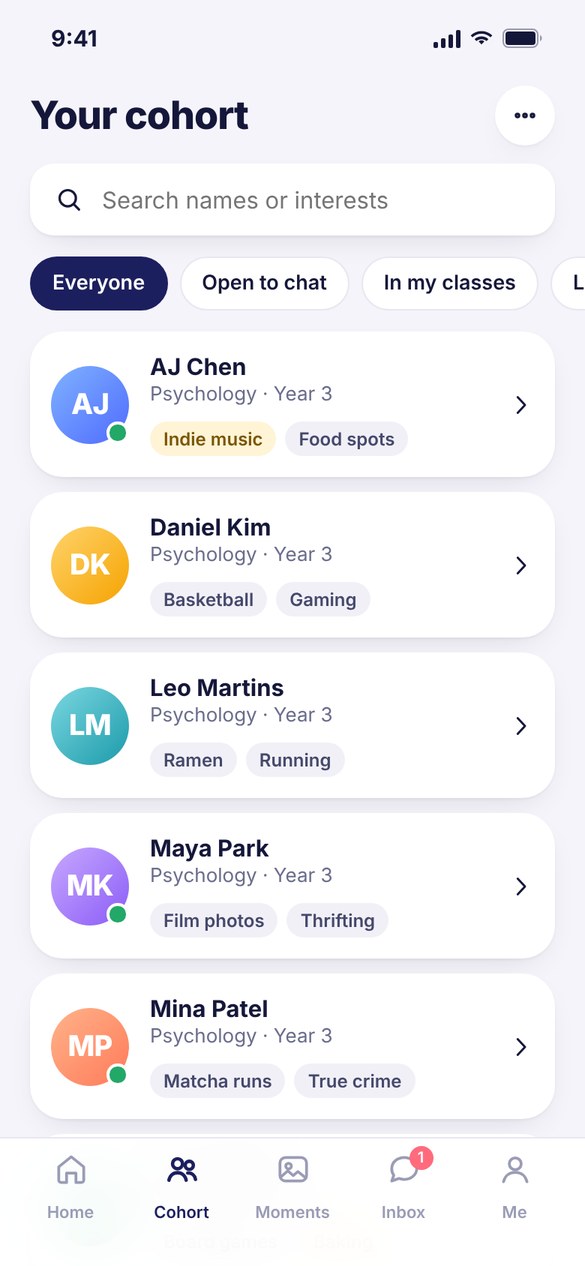
TStar cohort list with classmates and their interests
01browseSee your cohort

Friendly profiles of classmates in your program. Shared interests stand out, so you know what to say.
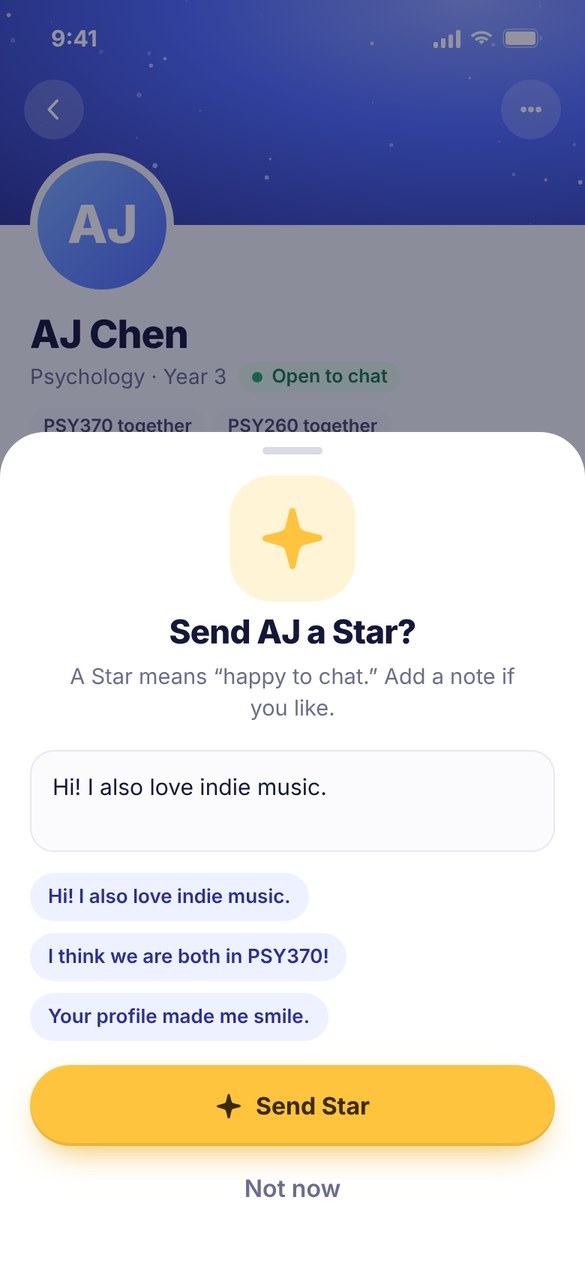
Send a Star sheet with an optional note
02starShoot a Star

One tap means “happy to chat,” with an optional note. Ignoring a Star sends no notice, so there is no rejection.
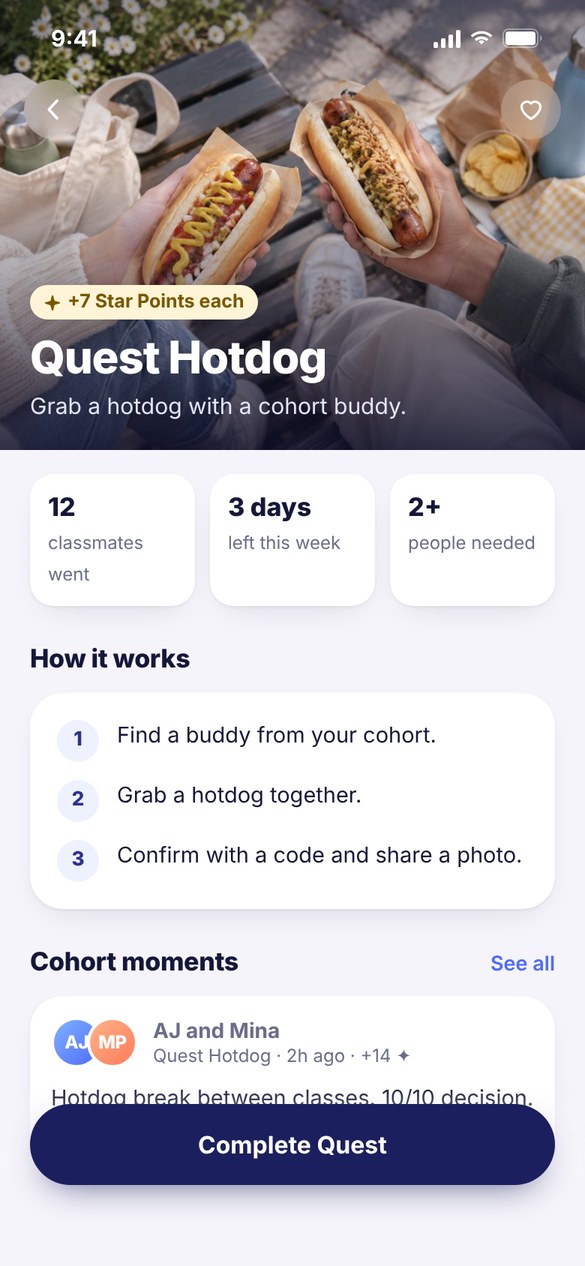
Quest Hotdog: grab a hotdog with a cohort buddy
03questDo a weekly quest

Small missions like “grab a hotdog with a cohort buddy.” Scan their code, share a photo and earn Star Points for the cohort rocket.


Research

31 surveys and 11 interviews, sorted into themes

I built the survey. Then we wrote every interview note on a sticky and grouped them. Four themes kept coming up.

5people said it

Big cohorts make it hard

“It’s hard to make friends in a large cohort.”

8people said it

Commuting cuts hangouts short

Long rides home mean leaving right after class, and skipping events.

5 of 11interviewees

Faculty events feel like work

“Catered to networking with working professionals.”

7 of 11interviewees

Friend circles stay tiny

Most make 1 to 3 friends per class. “Cohort feels cliquey.”


Persona

We designed for Shy Sherry

She is happy to chat once someone says hi. She will just never be the one to say it first.

Illustration of Shy Sherry
Shy Sherry
The passive listener
Age
21
Program
Psychology, Year 3
Lives in
Mississauga
Commute
1.5 hours each way

I want to make more friends and feel like I’m a part of things, but it’s kinda hard when everyone already has their own group.

Goals
  • Feel like she belongs
  • Balance school and friends
  • Keep a high GPA
Pains
  • Huge classes
  • Changing timetables
  • Too shy for events
Needs
  • Low-pressure ways to connect
  • Options that fit her commute
StructuredSpontaneous
IntrovertExtrovert
CautiousAdventurous
IndependentCollaborative

Her journey

From going home alone to feeling part of the cohort

We mapped Sherry’s first day of class today, then what it could feel like with TStar.

TodayFirst day of class
Big lecture“Everyone seems to know each other.”
NervousShy
Class discussion“I hope someone approaches me.”
HesitantAnxious
Small talk“I hope I don’t sound awkward.”
Self-conscious
Club event“This feels more like networking.”
Intimidated
Going home“Everyone else seems to have plans.”
LonelyDrained
With TStarA week of term
Before term“So many cool people with cool interests.”
ExcitedCurious
Morning“The answers are so funny.”
Motivated
On campus“This will be a fun experience.”
Confident
After class“I feel less pressured.”
IncludedSupported
Free time“My cohort is so interesting.”
Satisfied

How might we help shy and commuter students start friendships, without the pressure?


Ideas

We ranked every idea by impact and effort

The simplest one won: a tiny “poke” that says you are open to talking. We renamed it Shoot a Star and paired it with small shared quests.

  1. Home runShoot a Star (the poke), cohort profiles
  2. Big betBluetooth “who is nearby”
  3. Quick winsWalk-home buddy, matching prompts
  4. Marginal gainsBuddy of the week, hobby matchups
Big bets
Home run
Quick wins & marginal gains
Shoot a Star (the poke)Cohort profilesBluetooth “who is nearby”Walk-home buddyMatching promptsBuddy of the weekHobby matchups Bigger impact →Easier to build →

Paper prototype

Paper first, tested with three students

I sketched the quest and rocket screens and ran two of the three sessions.
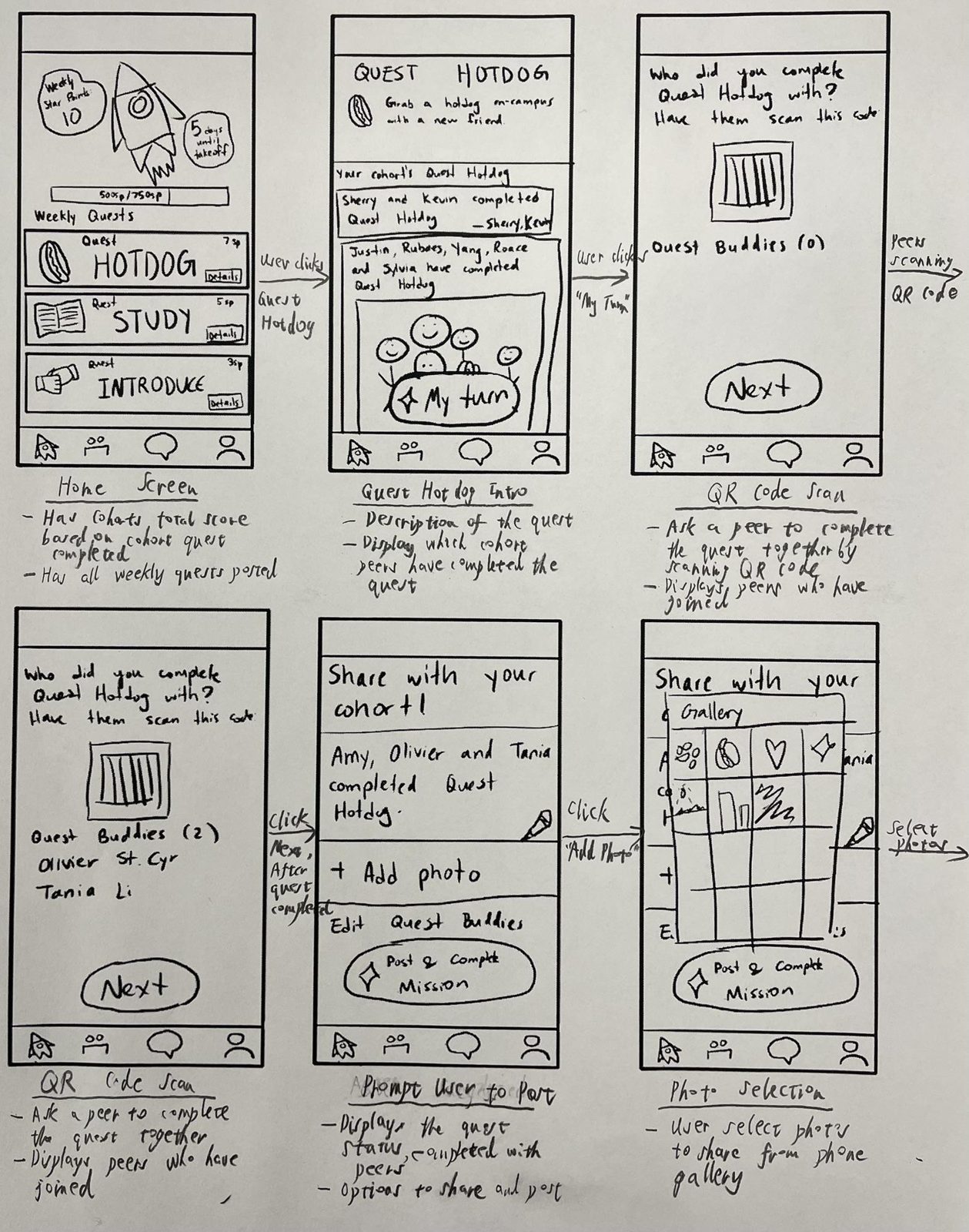
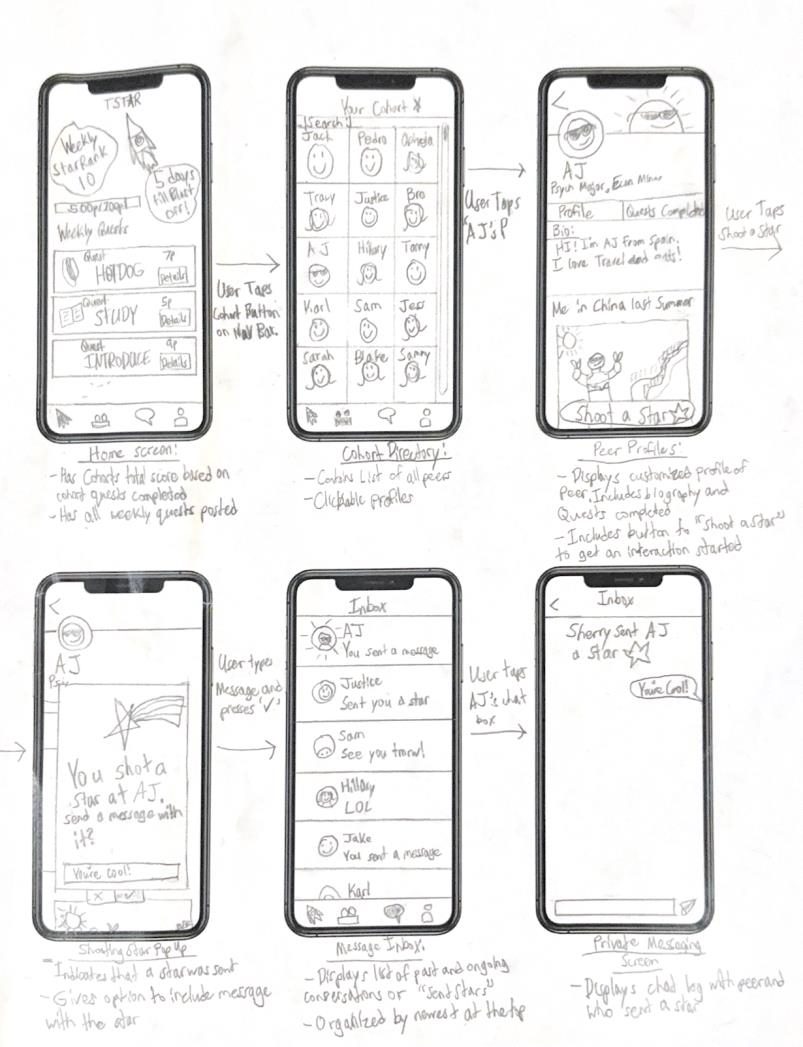
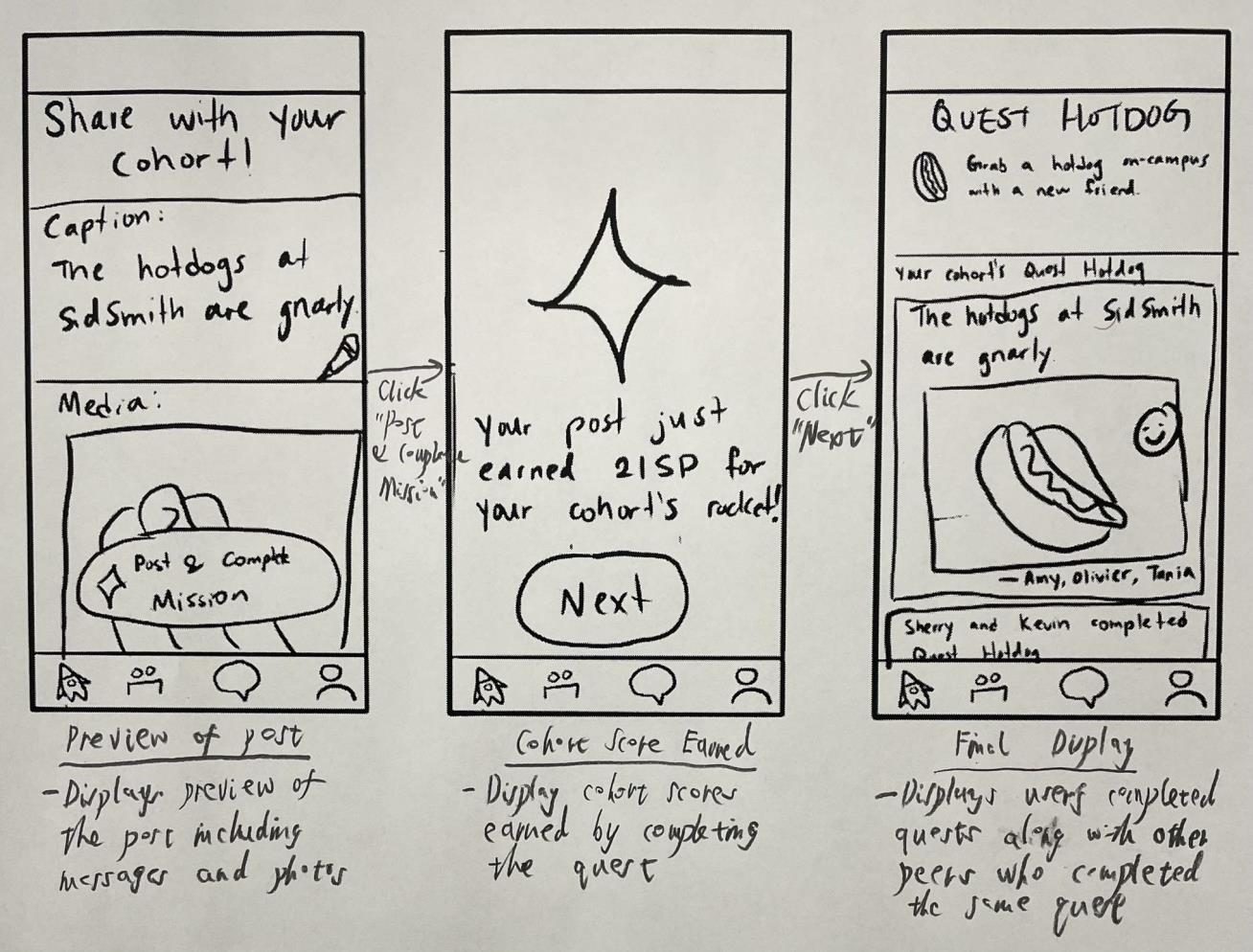
Paper sketches of the quest flow Paper sketches of Shoot a Star Paper sketches of sharing a post
“Is My Turn a button?”

Renamed it “Complete Quest”

No way to scan someone else’s code

Added “Show code” and “Scan code”

After a Star, users landed in the inbox

Go straight to that chat

Star icons on random buttons

Stars only where you earn points

Mid-fi prototype

A clickable Figma prototype everyone finished

Three new students did both tasks, once timed and once thinking out loud.

Task 1Send AJ a Star

12.9saverage
01Open the cohort
02Tap AJ’s profile
03Shoot a Star

Task 2Finish Quest Hotdog

23.4saverage
01Pick a weekly quest
02See who did it
03Show or scan a code
3 / 3finished both tasks1small slip

Still, testers asked

“What are Star Points?”
“Does Cancel cancel the Star?”
“How do I start the chat?”

Final design · 2026

I redesigned TStar on my own to answer every open question

Find common ground

Shared interests light up, so you know what to say.

Shoot a Star

One tap says “happy to chat,” and the chat opens right away.

Do a quest together

Scan a buddy’s code, post a photo, and fuel the cohort rocket.

My decisions

Why I made these calls

Every change in the redesign started with something a tester did or said.

Before
After
01

One action to say hi, not two

Saw
Testers could not tell “Shoot a Star” and “Send a message” apart.
Did
Merged them. A Star carries an optional note and opens the chat right away.
Before
After
02

Explain points where people ask

Saw
One tester asked, “What does going to the Moon do?”
Did
Added a 3-line “How Star Points work” sheet, one tap from the rocket card.
Before
After
03

Never block a quest on a dead phone

Saw
If a buddy’s phone is dead, nobody can scan.
Did
Added “Add them by name” so the quest still counts.
Before
After
04

Stop mistakes before they happen

Saw
The only slip in testing was posting before adding a photo.
Did
The post button stays off until a photo is added.
Before
After
05

Give people something to say

Saw
Testers said starting a chat after a Star felt dry.
Did
Added quick replies like “Want to grab lunch after class?” so the next message is one tap.

Product thinking

How I would know it works, and keep it safe

If TStar launched, these are the numbers I would watch and the guardrails I would build in from day one.

Success funnel

  1. Stars sentAre people saying hi?
  2. Chats startedDoes a Star turn into a talk?
  3. Quests doneDo they meet in real life?
  4. Back in week 2Does it stick?

Safety built in

  • Only people in your cohort can see you
  • Block and report on every profile
  • “Open to chat” is a switch you control
  • Ignoring a Star sends no notice, so there is no rejection

Why not just use…

  • Discord or group chats. Easy to join, but big and noisy. Shy students stay quiet.
  • Clubs and faculty events. Need time on campus and feel like networking.
  • Bumble BFF. Strangers from anywhere, not people in your classes.
  • TStar. Only your cohort, a tiny first step, and a reason to meet.

Live prototype

Try it yourself

Open full screen ↗


Next step

Testing the redesign

Next, I will run the same two tasks on the hi-fi version with five U of T students, ideally commuters.

Who
5
U of T students, ideally commuters.
Bar to beat
Faster
Than the mid-fi times on both tasks.
Success means
0
“What are Star Points?” questions.

Reflection

What I learned

The hardest part was never the screens. It was understanding how nervous people feel before they say hi, and designing around that feeling.

01

Calm beats features

Matching, games, live alerts→One small, simple action

Taking pressure away helped more than any extra feature.

02

Clear beats clever

“Blastoff”→Names that say what they do

All three testers asked what “Blastoff” meant.

03

Flow is everything

Star, then inbox→Star, then straight to chat

One extra screen can undo a good idea.

04

Gentle design for shy users

Points for everyone→Fun parts stay optional

Quieter students should never feel pushed.

What I would do next

  1. testHi-fi with real students
  2. AIOptional first-message suggestions
  3. questsFit each student’s schedule
  4. starsTry a daily limit
  5. retentionTrack use over a full term