Making new hobbies cheaper by swapping the supplies people never use

An app for swapping or buying unused hobby supplies with people nearby, taken from team research to my own working redesign.

Role
4 designers
Skills
UX research, product design, prototyping, usability testing
Duration
Jan – Apr 2026

Results at a glance

Usability score71.7 Average from 12 people testing our Figma prototype, rated “Good”.
Problem size86% From our survey of 42 people; 74% wanted to try a hobby last year but did not.
Time to finish a swap4.5 min Average for 12 testers to list old supplies, find something new and finish one exchange.

The problem

Starting a hobby costs money, and old supplies sit in drawers

Crochet needs hooks and yarn. Painting needs paints and brushes. People with leftovers rarely pass them on, and people starting out pay full price. Our survey of 42 people showed both sides.

Think about the cost of materials before starting a hobby76%
Wanted to try a hobby last year but did not74%
Would spend under $100 on a new hobby71%
Of people with unused supplies, just put them away86%

The solution

SkillSwap, a local app where swapping comes before buying

People list supplies they no longer use and trade them with someone nearby. If nobody has what they want, they can still buy cheaply. Every step is built to feel safe with a stranger.

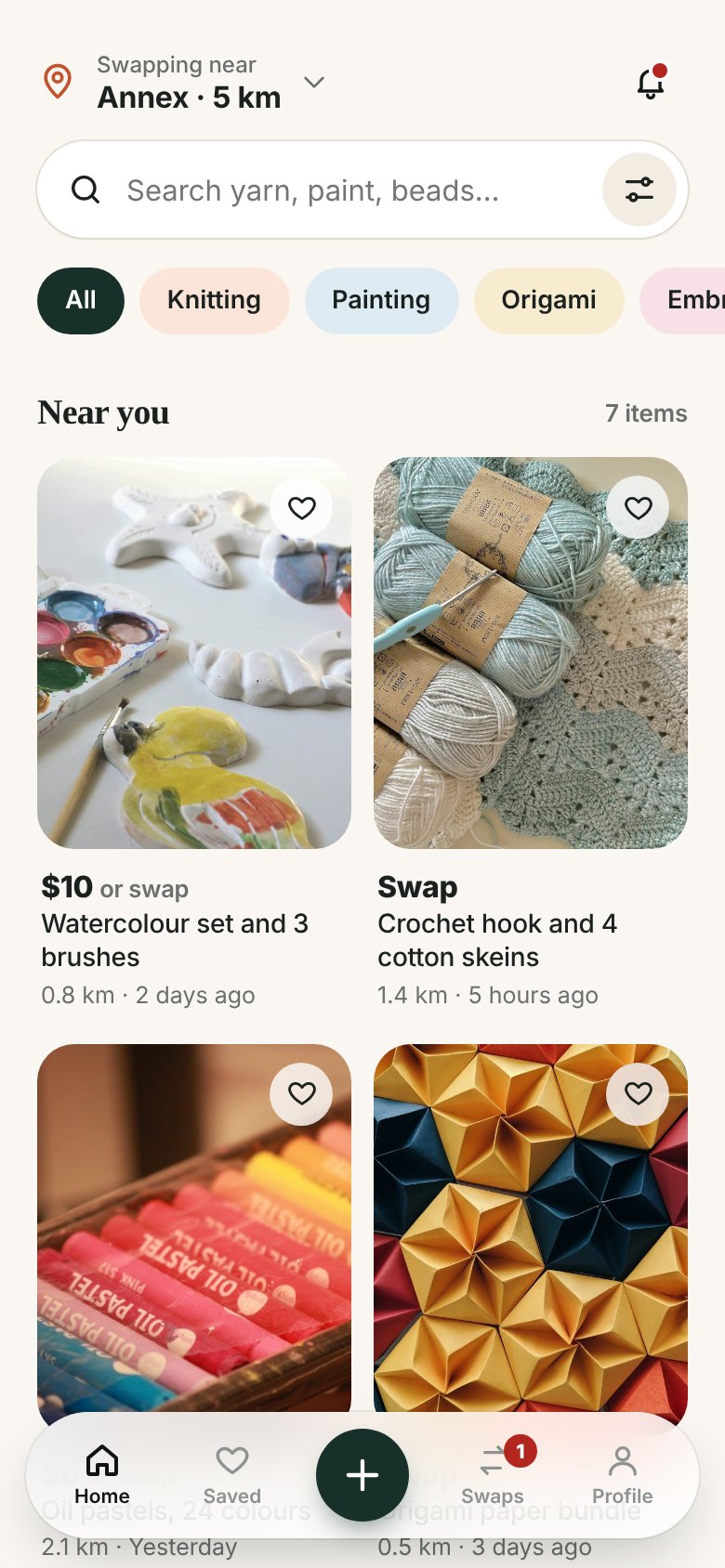
SkillSwap home with hobby tags and nearby listings
01browseFind supplies by hobby

Pick a hobby, set how far you will travel, and see what people nearby are ready to pass on.
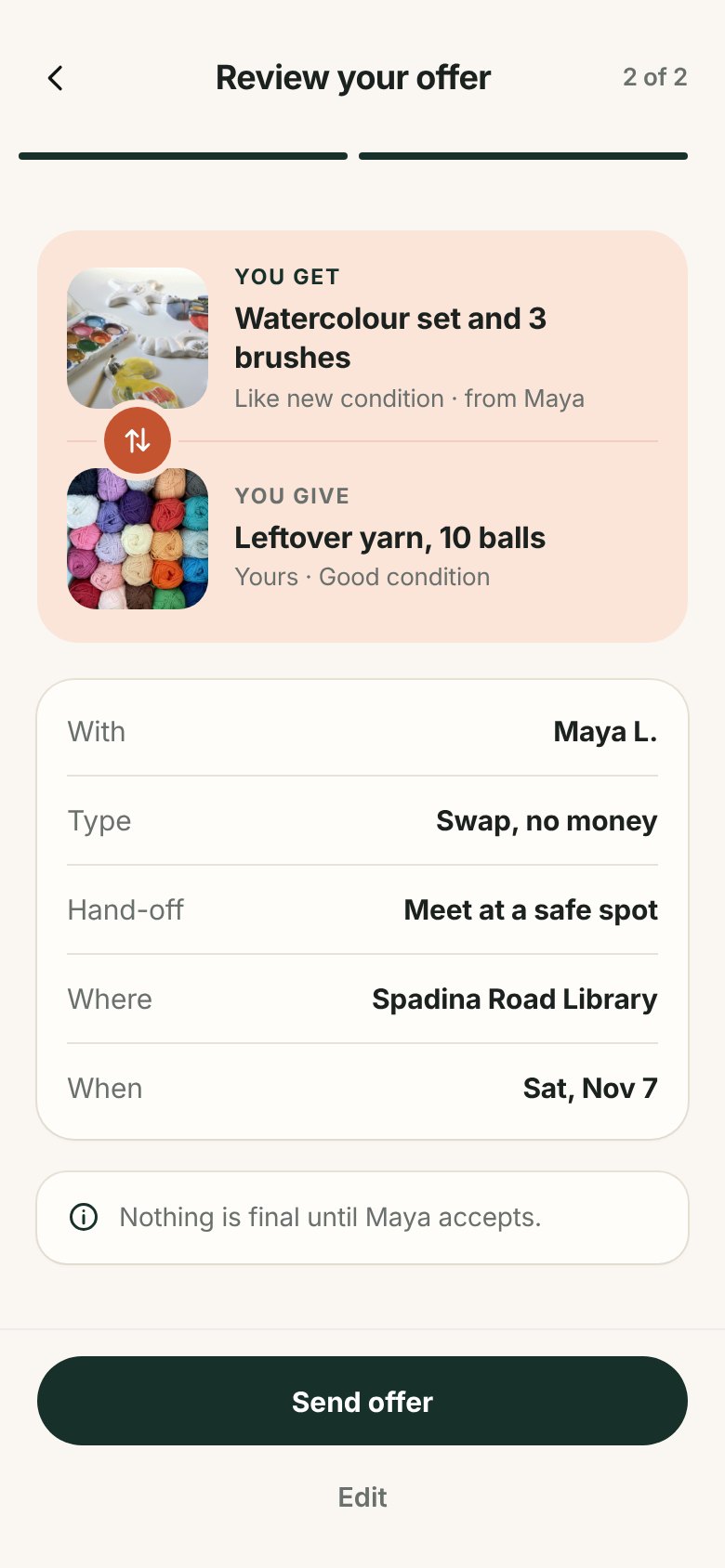
Review your offer screen showing yarn swapped for a watercolour set
02offerMake an offer in two steps

Choose what you give, where and when to meet, then check it all before you send.
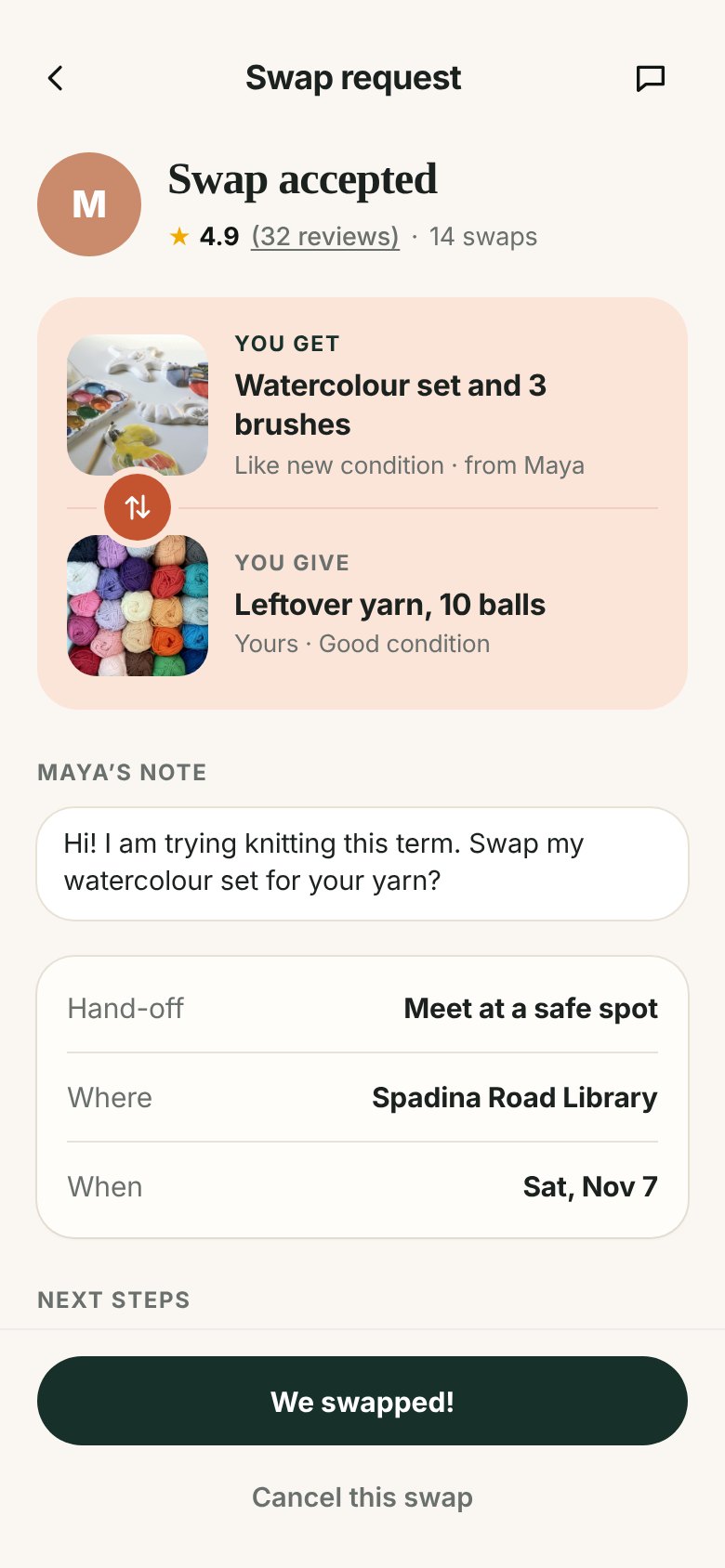
Accepted swap with the We swapped button
03confirmBoth people confirm

A swap only counts when both tap “We swapped!”, then each person leaves a rating.


Research

42 surveys and 7 interviews, grouped by who we heard from

The survey gave us the numbers and the interviews explained them. Here is who we heard from, and what that meant the app had to do.

5
Students with hobbies

Cost and time decide what they start. A supportive community keeps them going.

1
Small business owner

Sells press-on nails. Showed us how sellers think about stock and materials.

1
Campus sustainability lead

Pointed us to reuse. Across interviews, how much people thought about waste varied a lot.

“Always scared to give money or send to strangers. You might get scammed and there is no central authority.”A survey respondent, about Reddit

“Meeting with strangers can be scary, but can be alleviated by meeting in a public place.”A survey respondent, about Kijiji

What the app had to do

60%worry about the other person
Keep exchanges safe
65%worry about condition
Show the real condition
71%spend under $100 on a new hobby
Cost little or nothing
About halfwould not meet in person
Offer shipping
100%wanted local exchanges
Stay local

Persona

We designed for Sam, a curious beginner on a budget

He wants to try new hobbies but stops at the price of supplies. His mirror image is Cathy, a crocheter whose leftover yarn takes over her room.

Drawing of Sam
Sam
The curious beginner
Age
18 to 25
Occupation
Undergraduate student
Lives in
Toronto
Budget
Tight

I’m always on the lookout for ways to dive into new hobbies without breaking the bank or harming the planet.

Goals
  • Explore new hobbies
  • Find affordable, sustainable supplies
Pains
  • Budget limits what he tries
  • Used supplies arrive worse than shown
Needs
  • A place to discover hobbies
  • A way to stick to his budget
Spends freelySaves money
Sticks to oneTries new skills
Buys newReuses
PracticalCreative

Ideas to paper

Three concepts, merged into one, then tested on paper

Testers liked the trust score in the social concept but said the trading app felt like Facebook Marketplace. We kept trading at the centre, added community trust, and ran 5 expert reviews and 4 think-alouds on paper.
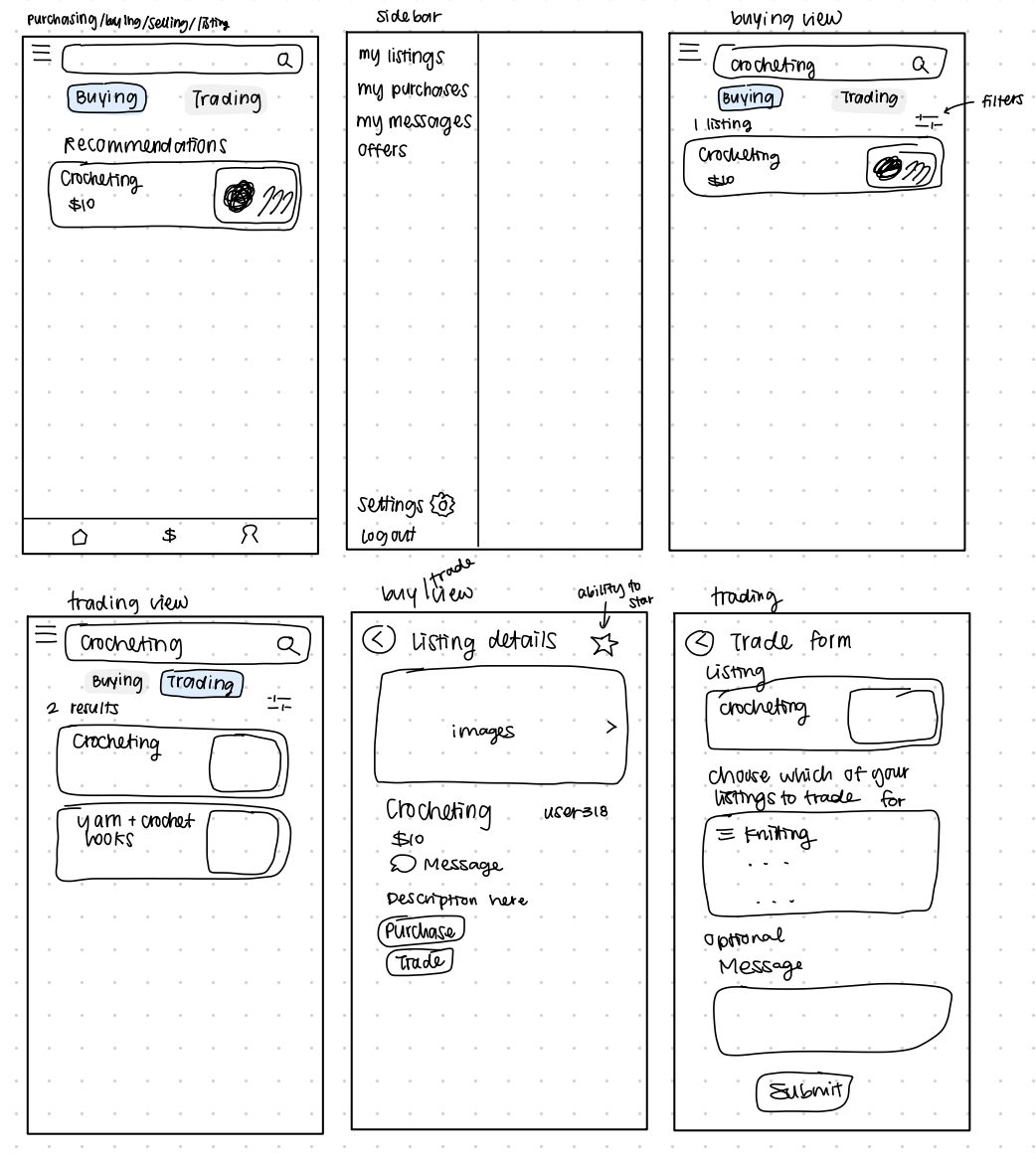
Sketches of the trading-focused app
01tradeTrading app

Fast search and trade requests. Felt too much like existing marketplaces.
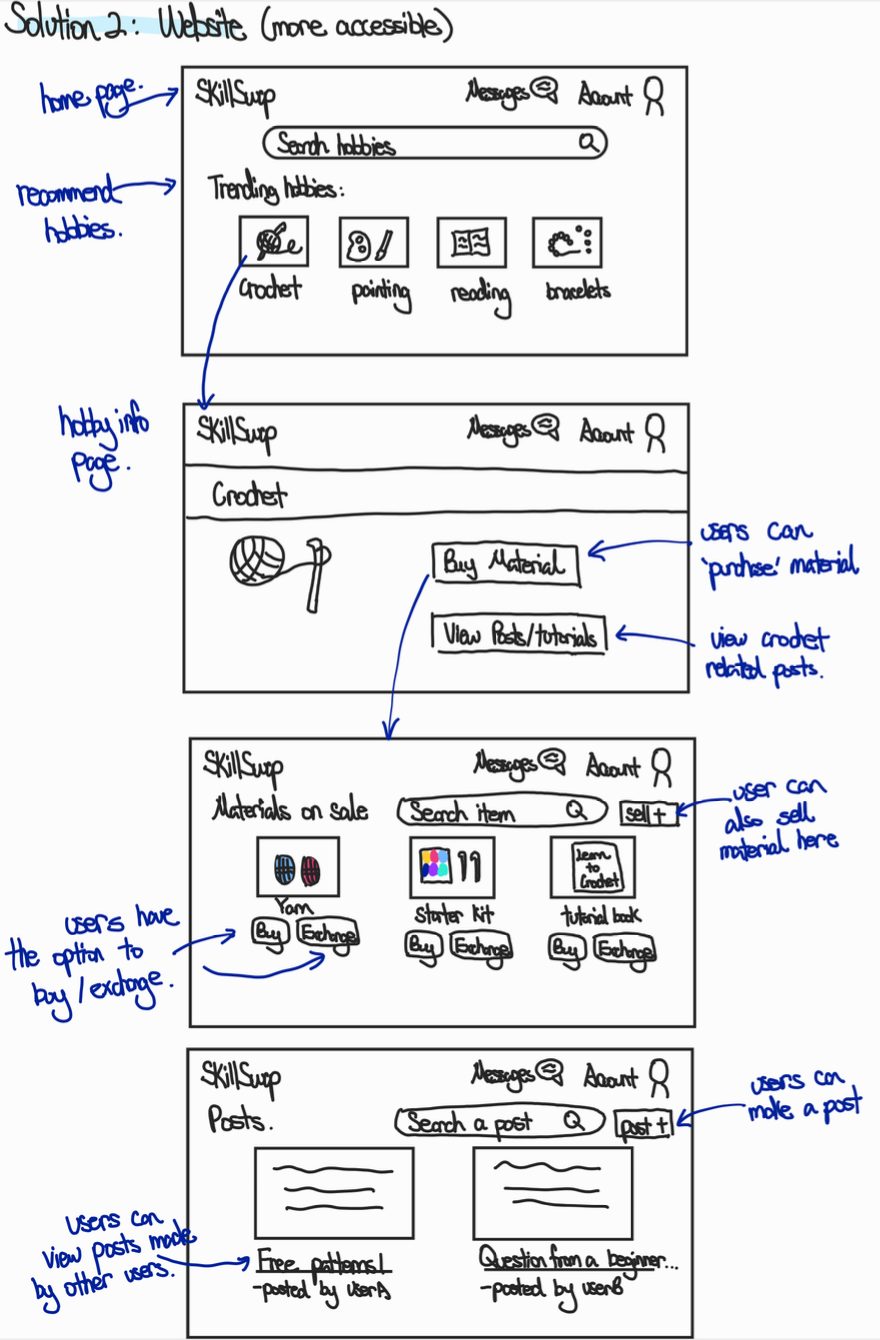
Sketches of the trading and forum website
02forumTrading plus forums

Added a forum per hobby. The forums did not help anyone find supplies.
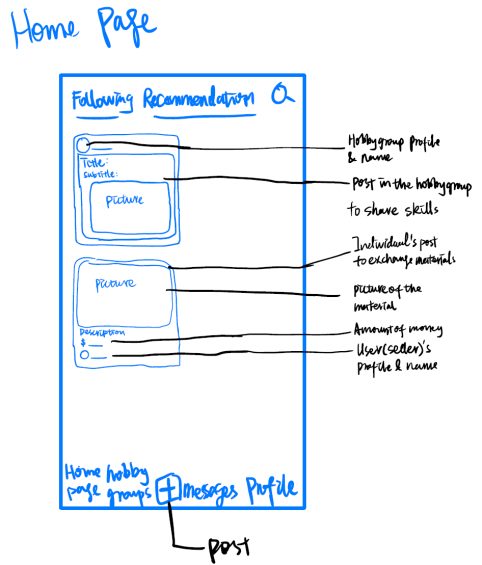
Sketches of the social community app
03socialSocial community

Hobby groups and a “SkillSwaps” count for trust. Liked, but unclear how a trade happens.

“Accept” and “Decline” in the chat looked like accepting the chat itself

Moved them onto the request

Nobody knew what the “SkillSwapped” button did

Explained it and made it the green confirm button

The “+” did not say a camera would open

Used a camera icon for live photos

Some pages had no menu bar or back button

Menu bar on every page, back button on the rest

Hi-fi prototype

A Figma prototype, tested with 12 people

We built the screens below in Figma. Ten hobbyists, one small business owner and one campus sustainability lead got one loose task: get rid of old supplies, find something new, and finish one exchange.

Home
Listing
Buying
Request
My listings
Post

Usability score (SUS) for each tester

123456789101112
4.5 minaverage to finish, from 2 to 8 minutes
3 of 12had used an exchange app before

“It was the same layout as pretty much any other app, so it was pretty simple to use.”Familiar, but not memorable

“[I] was confused about the accepting/renegotiate functionality in the chat.”Accepting was still unclear

“The home page is messy; categories are not clear.”Browsing needed order

“Couldn’t see the listings you posted. Tried to find it to see/edit.”No place for your own listings

Testers also asked to

Browse before making an account

Testers also asked to

Pay only after the other person accepts

Testers also asked for

Instructions for first-time users

Testers also asked for

Hobbies beyond arts and crafts


Final design

I redesigned SkillSwap on my own around what testers struggled with

Each clip is the live prototype playing itself. The reasons behind each change follow below.

01browse

Find supplies by hobby

Tap a hobby tag, or open “All categories”. Every card shows the name, then the price or “swap”.

02offer

Make an offer in two steps

Pick what you give, a public spot and a day, then check the whole trade before sending.

03confirm

Accept, renegotiate or decline

After the hand-off, both people tap “We swapped!” and rate each other.

04post

Post with a live photo

The camera opens straight away, so every listing shows the real item.

The rest of the app

All categories11 hobby groups, from fibre arts to gardening.
FiltersSwap or buy, condition, and “Wants what I have”.
ChatThe swap stays pinned above the messages.
Swap doneBoth items, then a quick rating.

My decisions

Why I made these calls

Every change started with something a tester did or said. On the left is the Figma prototype we tested, on the right my redesign.

Tested in Figma
My redesign
01

Give requests their own screen

Saw
People were unsure what accepting or renegotiating in the chat would do.
Did
A request screen that shows what you get, what you give, where and when, then Accept swap, Renegotiate or Decline. The chat stays for talking.
Tested in Figma
My redesign
02

Sort by hobby, not by store aisle

Saw
“The home page is messy; categories are not clear.” Testers also asked for hobbies beyond arts and crafts.
Did
Hobby tags on home, 11 groups under “All categories”, and filters for condition, distance and swap or buy.
Tested in Figma
My redesign
03

Pay only after a yes

Saw
Payment details were asked for before the seller had even accepted.
Did
A two-step offer: pick your item, a public spot and a day, then review. Nothing is paid until the other person accepts.
Tested in Figma
My redesign
04

Make strangers easier to trust

Saw
In our survey, 60% worried about the other person and 65% about the condition of used supplies.
Did
A live-photo label, condition up front, a tappable rating with reviews, and a reminder to meet in public.

How I built it

I built the redesign as working code with Claude

Instead of making more Figma screens, I described each screen and flow to Claude, which wrote the code. I reviewed every screen and asked for changes until it fit what testers needed.

Claude did

  • Wrote the HTML, CSS and JavaScript
  • Turned my notes into screens and flows
  • Made the self-playing clips above

I decided

  • Which tester problems to fix first
  • Patterns to borrow from eBay, Kijiji and Facebook Marketplace
  • Colours, spacing and every label, like “swapped” instead of “traded”

I pushed back on

  • A blue that did not fit the brand, replaced with dark buttons and pastels
  • A sign-up step, since testers wanted to browse before making an account
  • Crowded screens, split into fewer choices per step

Live prototype

Try it yourself

Open full screen ↗


Reflection

What I learned

Looking back, the biggest lessons were about scope and clarity, not screens.

01

Narrow the scope early

Trading, forums and tutorials→Trading done well

We were told early that the scope was too big. Cutting sooner would have left more time for the core flow.

02

Push ideas further apart

Three similar concepts→Truly different directions

Peers said our concepts looked like Facebook Marketplace. Wider brainstorming would have helped.

03

Labels must say what happens

“Accept” in a chat→“Accept swap” on the request

The same confusion came back in two rounds of testing until the action had its own screen.

04

Pick metrics that fit the task

Time and error rate→SUS plus clear task goals

Our open task made times vary from 2 to 8 minutes, and we had not defined what counts as an error.

What I would do next

  1. testRun the redesign with 10 hobbyists
  2. alertsNotify people when a saved search gets a match
  3. communityLet people talk about the same hobby